Apple Inc. won’t have to face a lawsuit alleging its watch copied heart-monitoring technology from a Khosla Ventures LLC-backed startup, AliveCor, a federal judge ruled. US District Judge Jeffrey White in Oakland, California, entered a judgment Tuesday in favor of Apple. Details of decision were filed under seal, due to confidentiality concerns by the companies. A redacted version will be made public in coming weeks.
“AliveCor’s lawsuit challenged Apple’s ability to improve important capabilities of the Apple Watch that consumers and developers rely on, and today’s outcome confirms that is not anticompetitive,” Apple said in a statement.
AliveCor said it was “deeply disappointed” in the decision and plans to appeal. “We will continue to vigorously protect our intellectual property to benefit our consumers and promote innovation,” the company said in a statement.
The dispute was based on a meeting in 2015, when AliveCor co-founder David Albert was invited by Apple executives to show off his heart-monitoring device, dubbed the KardiaBand. AliveCor claims Albert was told the iPhone maker intended to collaborate on the technology.
Apple has said the meeting was like hundreds of others it has hosted with developers over the years, with no pretense of a partnership.
After 18 months of discussions between the companies, in “a clear attempt to steal AliveCor’s thunder,” Apple announced its own heart health initiative for the Apple Watch, a few hours after AliveCor informed Apple of the official launch date for the KardiaBand, according to the complaint.
Over the next few years, as Apple updated the Apple Watch operating system, no other service was allowed to offer heart-rate monitoring on the device because of the company’s “concentrated campaign to corner the market,” AliveCor claimed in its antitrust complaint. Apple denied that allegation and said it has allowed third-party apps to use its heart-rate sensor technology since 2015.
AliveCor said separate patent claims against Apple are still being litigated.
The case is AliveCor v. Apple, 21-cv-03958, US District Court, Northern District of California (Oakland).
One more thing! We are now on WhatsApp Channels! Follow us there so you never miss any updates from the world of technology. To follow the HT Tech channel on WhatsApp, click here to join now!
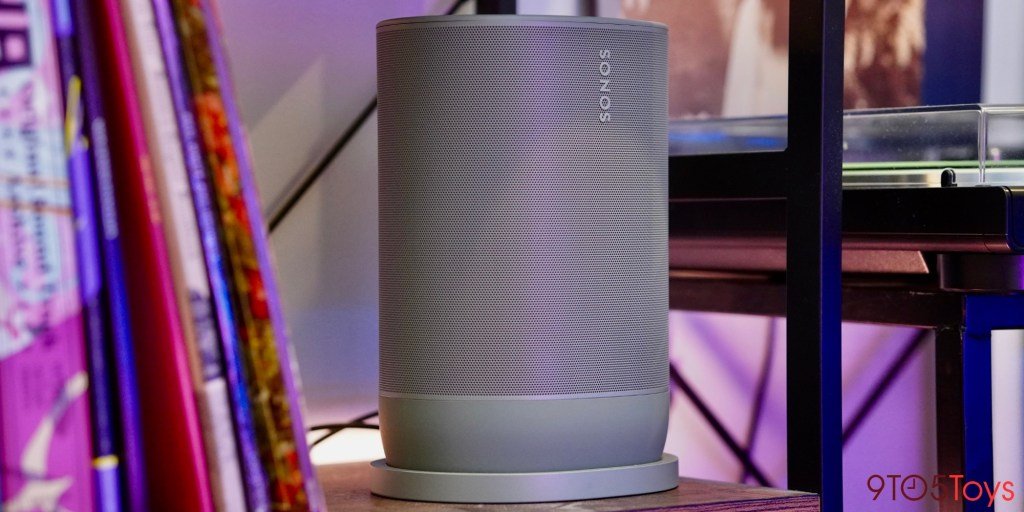
Sonos launched the new Move 2 portable smart speaker last fall, and I’ve been putting it through the paces of everyday listening for the past several months. Winning me over with a fresh olive green colorway, there’s far more to be excited like AirPlay 2, newfound stereo playback, and 24 hours of battery life.
Hands-on with the Sonos Move 2
I first started using the Sonos Move 2 back before the holidays when I wrote about it for my annual smart home gift guide. It initially wowed me enough to reccomend the $449 price tag back before Chirstmas, and that original sentiment has largely been the case in my longer term use. It isn’t going to be the ultimate speaker for every single use case, but fills a niche that has been getting overlooked as of late.
Smart speakers these days are almost entirely characterized by their onboard digital assistants. Whether it’s Siri, Alexa, or Google Assistant, being able to ask your speaker questions or have it control other gear in your smart home is arguably the most marketed use case.
But that’s not what I was looking for when I got the Sonos Move 2. I just want a really great portable speaker that offers more than what your typical Bluetooth offering would deliver. And for that, the Move 2 is everything I could have wanted.
Sonos was kind enough to send over its latest portable smart speaker the new Olive green color. Right out of the box, and that design was really all I could focus on. I fell in love even before I turned the speaker on just because of its novel colorway. It was about as notable of a first impression as the device could make, and sets itself apart from the classic white or black designs that pretty much every other smart speaker shares. Sonos does sell the Move 2 in those more traditional colors, but I am far more interested in just how adorable the green stylings are.
The actual form-factor is right in line with the rest of the Sonos lineup, which is to say as sleek as ever. It has its own charm, but is largely just an elliptic cylinder speaker that you can carry around in one hand thanks to the handle molded right into the casing. There are some touch controls on the top, as well as a physical array of switches around back. That’s not all too different from the original model, though.
New this time around for the second-generation version of Sonos Move is stereo audio, and oh does it make a difference. The speaker can easily fill my Brooklyn apartment without even climbing to half volume, with booming bass that doesn’t overpower the rest of the soundstage. The stereo playback is incredibly helpful in taking full advantage of its compact design, making the speaker sound far bigger than something you can carry around in one hand – let alone something that’s battery powered.
The Move 2 also rocks many of the signature features that anyone familiar with the Sonos ecosystem would expect. There’s TruePlay tuning for adapting audio to your surroundings, as well as both Bluetooth and Wi-Fi connectivity – the latter of which enables AirPlay 2.
Going into my experience with the Move 2 for the first time, I had a feeling that the charging element of the latest Sonos release was going to play a huge factor in my love for it. A portable speaker that I would have to constantly be plugging in was going to quickly kill my excitement, and luckily Sonos employs a very novel design. Sonos includes a wireless charging base that while incredibly simple, does the trick so well.
All you have to do is drop the speaker into the oval ring on your countertop or shelf and the speaker will begin charging. Lining it up is incredibly trivial, and it means that pretty much no thought goes into actually refueling the speaker. There is a USB-C port on the back for good measure, but it’s not something that I ever really need to use at home – though it does complement the IP56 water-resistance rating as a nice feature to have for using outdoors and away from the main dock.
Sonos Move 2 isn’t perfect, however. Almost every time I use it, I end up pausing my music for an hour or two before going back to play some more. But when it’s not resting on the charging dock, which it often isn’t, you can’t AirPlay directly to it. You have to instead go and wake it up with the button on the back or the touch controls on top, or through the companion app. It’s hardly a difficult process but it does leave a little to be desired. It’s just inconvenient enough that I feel the need to mention it, as this is the one pain point I have with its smart features.
I get that it’s something that Sonos likely is doing on purpose, too. It’s a way to cut back on unnecessary battery drain from its 24 hours of playback, but I do wish there was more I could change in the companion app. Sonos goes as far to enable a battery saver mode in the app, but I wish there was more than just a simple on or off. Still, it’s hardly a dealbreaker and is really only an issue because of the way I am used to using an always-on and hardwired smart speaker.
9to5Toys’ Take
After using the Sonos Move 2 as my daily speaker for the past few months, I’m sold on it being an essential buy for any existing Sonos user. I’d even go as far to say that it’s a phenomenal way to dive into the ecosystem for the first time, offering a design that works just as well on its own as it does with the rest of your whole-home audio system.
If you’re looking for a speaker to use out on the patio this spring and summer, or just a portable offering to bring around the house, this is it. The Sonos Move 2 doesn’t completely replace the compact and ultra-rugged Bluetooth speakers out there, but it does go far enough to be a versatile option for listening anywhere in or outside of your home. The sound is great, the connectivity and smart features are as robust as you’ll find, and the design is just so cute.
OnePlus recently launched the OnePlus 12 series and the OnePlus Buds 3 which had some massive upgrades and new features. Fans have been excited about the launch and to get their hands on the newly launched devices. Now, the OnePlus 12R and OnePlus Buds 3 sale is live on various online platforms and OnePlus stores. If you are someone who has been waiting for the sale to kick off check out the details and the launch offers which you can avail during the purchase.
Contents
OnePlus 12R and OnePlus Buds 3 price and launch offers
The sale for OnePlus 12R and OnePlus Buds 3 started yesterday, February 6, 2024. Both of the devices are available in the mid-range segment. Now, you can buy newly launched devices from e-commerce platforms such as OnePlus Store App, Amazon, Flipkart, and various other offline partner stores.
The OnePlus 12R starts at a price of Rs.39999, and the OnePlus Buds 3 is priced at Rs.5499. The e-commerce platform is providing Rs.1000 off while using the ICICI Bank Card and OneCard.
B0CQYMVLQ4-1
On purchase of OnePlus Buds 3, buyers can get Rs.1000 off with ICICI Bank Card and Citibank Card. Additionally, with IDFC FIRST Bank Credit Card EMI transaction, buyers can avail Rs.2000 discount.
OnePlus 12R specs
The OnePlus 12R sports a 6.78-inch AMOLED ProXDR display with up to 120Hz refresh rate. It is powered by a Qualcomm Snapdragon 8 Gen 2 chipset coupled with Adreno 740 GPU for graphic-intensive gaming. For photography, the OnePlus 12R features a 50MP Sony IMX890 main camera, an 8MP ultra-wide angle lens and a 2MP macro lens. On the front, it comes with a 16MP selfie camera. For lasting performance, the smartphone is backed by a 5500mAh battery which supports a 100W SUPERVOOC charger. The smartphone will be available in two storage variants: 8GB RAM and 128GB internal storage, and 16GB RAM and 256GB storage.
Also, read these top stories today:
More Than Just Chip Power!Nvidia and Cisco are teaming up to make it easier for corporations to build their own AI computing infrastructure. Cisco will offer Nvidia-based equipment along with its networking gear. Find out morehere.
Bluesky Social Goes Public!After a year of staying in the invite-only phase, former Twitter CEO Jack Dorsey’s decentralized social media platform Bluesky Social has opened for the public. Dive inhere.
Apple Defeats AliveCor Suit! A US District Judge has ruled that the iPhone maker won’t have to face a lawsuit alleging its watch copied heart-monitoring technology from a Khosla Ventures LLC-backed startup, AliveCor. Read all about ithere.
【Supports adding up to 128 sub-devices】Zigbee Bridge Pro supports adding sub-devices increased from 32 to 128. 【Smart Home Security】Set up home security modes, such as home mode, away mode, and sleep mode. The bridge can be used as a local alarm. 【Local Smart Scene】Timing and scene linkage between Zigbee devices can be executed normally even if the network is disconnected. 【Wi-Fi & Zigbee Dual-protocol Support】Make communication between Zigbee devices and WiFi devices. 【Strong Connectivity, Limitless Possibility 】The Bridge supports to add ZigBee devices that SONOFF has released, like ZBMINI-L smart switch and S26R2ZB smart plug, making your home smarter. NOTE: ZB Bridge-P can connect 26 sub-devices directly (10 end devices + 16 routers, or 26 routers). If you want to connect to 128 sub-devices, routers are required, and one router-device can expand to connect 20-32 sub-devices. SONOFF Zigbee Bridge Pro can work with the devices below: Router: ZBMINI smart switch,S40 Lite ZB smart plug, S31 Lite ZB smart plug, S26R2ZB smart plug End Device: ZBMINI-L smart switch, SNZB-01 switch, SNZB-02 Temp. and Hum. sensor, SNZB-03 motion sensor, SNZB-04 door/window sensor
Price: ₹3,899.00 (as of Feb 07, 2024 09:34:42 UTC – Details)
Samsung launched Galaxy AI with the Galaxy S24 series in January and it grabbed a lot of attention in the smartphone market. While people are talking about Galaxy AI and its advanced features, older Galaxy smartphone users are wondering whether they will be getting the AI features or not. Well, there is some good news. According to a recent leak, it is anticipated that high-end devices of Samsung Galaxy smartphones including the Samsung Galaxy S23 series will be getting Galaxy AI features. Check more details here.
Samsung Galaxy S23’s upcoming AI features
According to an X user named Tarun Vats’s post, Samsung is planning to bring Galaxy AI features to all the 2023 high-end versions such as the Galaxy S23 series, Galaxy Z Fold 5, Galaxy Z Flip 5 and the Galaxy S23 FE. Sadly, the budget and mid-range Galaxy smartphone will not have any AI features according to the current leak.
The source highlighted four major Galaxy AI features which may be seen in the above-mentioned smartphones. Those AI features would be Circle to Search, Live Translate, Note Assist and Photo Assist.
With the Circle to Search feature users don’t have to type in to search, they will just have to circle the subject to ask for Google Search.
Additionally, the post highlighted that there will be two versions of OneUI 6.1, one will feature AI and the other will skip the Galaxy AI features. As of now, it is expected that the Galaxy S23 series will be getting the AI features in the first half of 2024, however, the exact date and rollout to other devices are unknown. Additionally, we may also see the AI features of the Galaxy Tab S9 which was unexpected, however, it may come as a major disappointment to the Galaxy S22 users.
The integration of four major Galaxy AI features including the Circle to Search feature will give a boost to the smartphone experience of these users. Notably, this feature will likely be seen in some Google Pixel devices and the Samsung high-end versions of 2023.
Also, read these top stories today:
More Than Just Chip Power! Nvidia and Cisco are teaming up to make it easier for corporations to build their own AI computing infrastructure. Cisco will offer Nvidia-based equipment along with its networking gear. Find out more here.
Bluesky Social Goes Public! After a year of staying in the invite-only phase, former Twitter CEO Jack Dorsey’s decentralized social media platform Bluesky Social has opened for the public. Dive in here.
Apple Defeats AliveCor Suit! A US District Judge has ruled that the iPhone maker won’t have to face a lawsuit alleging its watch copied heart-monitoring technology from a Khosla Ventures LLC-backed startup, AliveCor. Read all about it here.
AI roundup: In today’s world of artificial intelligence (AI), the UK announced a whopping $125 million investment plan for AI research and training regulators about the technology. On the other hand, Amazon’s new AI assistant answers shoppers’ queries and product questions. However, the AI tool raises questions among experts due to Amazon’s secrecy over the newly introduced AI assistant. Check out what’s going on.
UK is investigating $125 million for AI research and regulations
On Tuesday, Britain revealed their AI investment plans to upscale research. The country plans to build nine new research centres in AI. Additionally, the country will also work on training the regulators about the technology. Technology minister Michelle Donelan said, “AI is moving fast, but we have shown that humans can move just as fast. By taking an agile, sector-specific approach, we have begun to grip the risks immediately,” according to a Reuters report.
2. Amazon’s AI assistant rolling out; experts raising questions
Amazon is steadily rolling out the artificial intelligence assistant Rufus, however, experts are raising concerns over its algorithm secrets. Michael Pachter, a Wedbush Securities analyst said that Amazon would be missing out on potential revenue if it didn’t allow advertisers to access Rufus. Pachter said, “Advertising drives retail and Amazon is no different – why do you think they are generating tens of billions of dollars in advertising a year,” according to a Reuters report.
3. HP Spectre x360 laptop announced with AI capabilities
HP finally launched its AI-powered Spectre x360 laptops in India today. The laptops come in two sizes: 14-inch and 16-inch and are powered by Intel Core Ultra 7 processors with Neural Processing Unit (NPU) for AI capabilities. HP says that these are the world’s most adaptive personal computers as they can manage AI tasks alongside CPU and GPU. The HP Spectre x360 laptops starts at a price of Rs.164999, according to a CNBC report.
4. The researchers used AI to read a 2000-year-old scroll buried by Vesuvius eruption
In shocking news, a group of three researchers used AI technology to read out the 2000-year-old scroll buried by the Vesuvius eruption. The researchers were awarded with $700000 prize for solving the mystery. The three researchers were Youssef Nader, a PhD student in Berlin, Luke Farritor, a student and SpaceX intern from Nebraska, and Julian Schilliger, a Swiss robotics student, as reported by Phsy.org.
5. Cisco and NVIDIA to deliver AI infrastructure solutions to enterprises
Today, both leading tech companies, Cisco and NVIDIA announced their collaboration to build AI infrastructure solutions. This will help enterprises to build their own AI services and join the race of leading technology. Chuck Robbins, Chair and CEO of Cisco said, “Strengthening our great partnership with NVIDIA is going to arm enterprises with the technology and the expertise they need to build, deploy, manage, and secure AI solutions at scale.” According to a press release.
Also, read these top stories today:
Deepfakes On The Rise! A finance worker in Hong Kong transferred more than $25 million to scammers after they posed as his colleagues on a video call, marking perhaps the biggest known corporate fraud using deepfake technology to date. Know how to spot deepfakes here.
Meta Urged to Rethink Its Policy! Facebook owner Meta’s policies on manipulated media have been criticized as ‘incoherent’ and insufficient by an oversight board. Dive in here.
Tech Layoffs Continue! The tech industry has started 2024 with another wave of job cuts, paring back even further after widespread layoffs last year. So far, some 32,000 tech workers have lost their jobs in 2024. Find out more here.
We are now living in a world where we are constantly surrounded by electronic devices to carry out our day-to-day tasks. However, we are most reliant on our phones for all kinds of things, personal or professional making it a hazardous habit for our physical and mental wellbeing. So, we have all heard about phone neck, but now, a study has warned smartphone users of phone knee problems too. A recent study reveals that overuse of phones is causing constant knee and joint pain. It has revealed a surprising connection between the overuse of phones and knee pain. Experts say that our knee and joint pain is associated with the overuse of phones. Additionally, various types of musculoskeletal conditions are related to the overuse of phones and less physical activity. Know more about the study here.
Does phone overuse cause joint pain?
According to research by NIH (Via Phone Arena), experts have found a surprising relation between knee or any kind of joint pain with the overuse of phones. Experts say that excessive phone use or even more than four hours of usage can cause joint and muscle problems. Josh Gordon, a Technology Expert from Geonode said, “When we’re constantly hunched over our phones, our body weight shifts, and this can place added stress on the knees.” It simply means that when we are using our phones while sitting in a place, we restrict our body and muscle movements causing severe stress to our joints specifically knees.
Our joints and muscles are built for constant movements to improve flexibility, however, our current lifestyle is affecting our physical strength and causing various kinds of musculoskeletal conditions. Our improper positions while using small screen devices also have an effect on our knee joints, tendons, and ligaments. Furthermore, it also results in weight gain which is associated with several health issues. Therefore, one must restrict the overuse of smartphones or conduct kinds of physical activities to avoid joint and muscle problems. Phone usage for more than four hours a day is scary hazardous and one must strictly set a time limit for any electronic device usage. Researchers and experts now recommend limiting screen time with some exercise activities on a daily basis.
Also, read these top stories today:
Deepfakes On The Rise! A finance worker in Hong Kong transferred more than $25 million to scammers after they posed as his colleagues on a video call, marking perhaps the biggest known corporate fraud using deepfake technology to date. Know how to spot deepfakes here.
Meta Urged to Rethink Its Policy! Facebook owner Meta’s policies on manipulated media have been criticized as ‘incoherent’ and insufficient by an oversight board. Dive in here.
Tech Layoffs Continue! The tech industry has started 2024 with another wave of job cuts, paring back even further after widespread layoffs last year. So far, some 32,000 tech workers have lost their jobs in 2024. Find out more here.
The world of AI has progressed quickly over the past couple of years, thanks to generative AI. The technology has also started creeping into different communication mediums beyond just the written word. In that vein, Voice.ai allows you to change your voice to make it sound more like a famous celebrity or character. It looks like a simple voice changer app on the surface but there’s more to it than meets the eye. So in this article, let’s break down what Voice.ai is and how you can use it to transform your voice.
Contents
What is Voice.ai?
Calvin Wankhede / Android Authority
Voice.ai is a free-to-try piece of software that uses artificial intelligence to change the way your voice sounds. It can change your voice in real-time, meaning you can use it during calls in apps like Discord, Skype, and Google Meet. Unlike older voice changers that simply add a filter to your voice, Voice.ai says it has trained its model on 15 million unique speakers to improve the output quality.
If you’re a livestreamer or content creator, you can use Voice.ai to change the way you sound for comedic purposes. Likewise, it can come in handy when you need to disguise your original voice and stay anonymous. You can even go the opposite route and create your own voice that others can use to create their own content.
Voice.ai can make you sound like a famous celebrity or animated character. Take your pick.
Since Voice.ai allows anyone to train custom voices, you can find hundreds of celebrities, politicians, and cartoon characters in the app’s library. The quality can vary quite drastically between voices, so you may want to try a few different samples before zeroing in on one.
The software does have a few more downsides. Unlike many of the AI voice generators available today, you cannot convert typed text into speech. Instead, you can only record your own voice and have that converted. So if you’re trying to record a voiceover, you’ll have to ensure your tone and pronunciation remains consistent throughout.
How does Voice.ai work?
C. Scott Brown / Android Authority
Voice.ai uses a process known as deep learning to extract distinctive vocal features from the recordings you provide it with. Then, it can modify new recordings to reproduce the speech patterns from its training.
The AI-driven approach allows Voice.ai to replicate different kinds of human speech, ranging from anime characters to a deep-voiced actor. However, the voice changer’s resulting quality depends entirely on the amount of training data provided to it.
If you want to train your own voices, Voice.ai recommends uploading at least 15 minutes of audio samples. However, this little training data will only yield a barely usable model in many cases. For the best results, you’ll want to upload several hours of audio recordings for training. This will take a while to process, but it’s your best bet at getting a good recording or output at the end.
Voice.ai lets you create your own voice model, if you have enough audio samples.
Luckily, you don’t have to worry about training your own model as Voice.ai’s library has hundreds of voices to choose from. Even better, each voice has a standardized audio sample and user rating so you can gauge the quality beforehand.
Once you’ve selected your preferred voice, you can either use it to change your voice in pre-recorded files or modify your microphone’s input in real-time. The Live Mode is much more intensive as Voice.ai needs to change your voice with as little delay as possible. You’ll need a dedicated graphics card in your computer and, even then, you may have to dial down the speed in favor of higher quality.
Is Voice.ai free?
Yes, Voice.ai is free to try if you only want the most basic voice changing feature but many headlining features do require you to pay up for a recurring Pro subscription. Unfortunately, the use of third-party models falls into the latter category. You can also buy and earn credits to use on individual voices.
Voice.ai is free to try but most features are locked behind a subscription.
If you volunteer to donate your computer’s processing towards training Voice.ai models, you will receive some credits for free. However, I would recommend against enabling this as earning credits is a very slow process and could result in higher power bills at the end of the month.
As for the Pro subscription, you get a few different options to choose from. The subscription will cost you $20 per month during promotions ($30 full price). You can get a better deal paying yearly as it will only set you back $60 during a sale (or $80 at full price). The app also offers a month-long free trial, although you’ll still have to provide credit card details and manually cancel the subscription before the next month.
Is Voice.ai safe?
Even though Voice.ai isn’t backed by any large company, it’s safe to use. The program doesn’t cause any potential harm to your system, at least in its current iteration.
Having said that, you should avoid using the background model training feature, even if it earns you free credits. At the very least, make sure it’s not draining too much of your computer’s resources and that your electric costs don’t outweigh the benefits.
How to use Voice.ai
Calvin Wankhede / Android Authority
You can download Voice.ai for free on Windows and macOS computers as well as Android and iOS. Here’s a quick guide on how to get started:
Download Voice.ai for your operating system from the official website. On mobile devices, look for the app in the app store.
Double click the installer and follow the instructions. It may take a few minutes to download additional files.
Once the install completes and you click Finish, the Voice.ai app should automatically open. If not, search for the app in the Windows Start menu and launch it manually.
Create an account and follow the instructions. The app may ask whether you’d like to exchange your computer’s idle resources in exchange for free credits. We’ve already offered our advice on this step in the above section.
That’s it, Voice.ai can now change your voice. The default screen will allow you to record audio but you can also switch over to the Live mode. The latter will change your voice in real-time.
Calvin Wankhede / Android Authority
To use the Live Mode in voice calls, you’ll have to force each chat app to use Voice.ai’s virtual microphone. Here’s how you can do it in Discord. The general steps remain the same for other apps like Google Meet and Zoom.
Open the chat app of your choice, we’ll use Discord for this guide.
Look for the Settings icon and click on it.
Navigate to the Audio or Voice tab.
Under the Microphone drop-down menu, select “Microphone array (Voice.ai Audio Cable)” as pictured above.
In the Voice.ai app, navigate to the Live Mode tab and click on the Start Live button.
That’s it, your voice will now sound different to others during calls, albeit with some processing delay. You can disable the voice changer at any time.
Redmi has announced the India launch date of its upcoming earbuds, the Redmi Buds 5. The company revealed on its social media handles that the device will be launched in the country next week. Some of the key specifications of the Redmi Buds 5 have also been revealed, and it will offer support for 46dB hybrid active noise cancellation (ANC) and will be equipped with 12.4mm drivers. The new product is set to debut just a month after the launch of the Redmi Note 13 5G series in the country.
The earbuds were teased by the Chinese smartphone maker via a post on X (formerly known as Twitter) that reveals the headset will be launched on February 12. More details about the Redmi Buds 5 were shared on a landing page created on Redmi’s website. The truly wireless stereo (TWS) earphones will feature 12.4mm dynamic drivers. The Hybrid ANC on the device can cancel out ambient sounds as low as 46dB.
Based on the promotional images, the earbuds look very similar to the Redmi Buds 4 Active but the case design is different — it appears similar to the OnePlus Buds Pro 2. It appears to be available in black and white colour options.
Meanwhile, tipster Ishan Agarwal claims the Redmi Buds 5 will feature three transparency modes. Redmi is yet to announce support for these modes, but the company mentions that the TWS earphones will offer different sound modes.
The Redmi Buds 5 will support dual-device pairing, and it might also get Google Fast Pair for quickly connecting with paired devices, according to the tipster. The company has also revealed that highlights that the TWS earphones will get dual microphones and an AI call enhancement feature for better clarity during calls.
While the Chinese smartphone maker did not mention the battery life of the buds, it claimed that the case will give users up to 38 hours of playtime. As per leaks, the earbuds might get 10 hours of playback.
Wi-Fi Split AC with Auto Convertible Inverter compressor which adjusts power based on heat load. It is most energy efficient and has lowest-noise operation | Seamless hands-free operation and Voice Control with Auto Convertible Alexa and Google Assistant Capacity: 1 Ton – Suitable for small sized rooms (< = 120 sq ft) | Equipped with Powerful and Dry Mode for different cooling needs Energy Star Rating: 5 Star | Annual Power Consumption: 589.13 kWh | ISEER: 4.6 The star rating is as per BEE guidelines on or before 30th June 2022. Manufacturer Warranty: 1 Year Comprehensive | 5 years on PCB |10 years on Compressor | 5 years on Outdoor Casing Copper Condenser Coil with Shield Blu Technology: Anti Corrosion Blue Fin Technology | Enhances durability in high humidity coastal areas Special Features: Auto Convertible | nanoe-X Technology | Wi-Fi Air Conditioner | Works with Amazon Alexa and Google Assistant | Smart Diagnosis with One Touch Service |PM 2.5 Filter | Customized Sleep Profiles | Remote Access and Control with Miraie nanoe X technology: Cleans and deodorizes the air by producing nano-sized hydroxyl radicals (also known as OH radicals | Inhibitory effect on the adhered coronavirus (SARS-CoV-2) | Inhibits Pollen, Allergens, and Odor Miraie: Connected Living | Voice Control | Smart Diagnosis | Comfortable Sleep Profile |Full Control Anytime Anywhere Indoor Unit Dimension :87(L)|23.6(B)|29.6(H) | Outdoor Unit Dimension :78(L)|28.8(B)|54.2(H) | IDU Weight : 10 kg | ODU Weight : 23 Kg
Price: ₹43,000.00 (as of Feb 05, 2024 09:31:56 UTC – Details)